Skylight's Magic Import turns forwarded emails into calendar events, and it's part of Skylight's Calendar Plus subscription. Agenda Hero does the same for free. Forward any email to [email protected], and Agenda Hero emails the events back to you. Add them to Google Calendar, Apple Calendar, Outlook, or Agenda Hero. If your Skylight shows your Google Calendar, the events show up there too.
Why turn emails into calendar events?
One of the features people love about Skylight Calendar is Magic Import. Forward an email with dates in it, and the events land on your calendar. It's a fantastic idea. Who wouldn't want to spend less time typing dates by hand?
Think about everything that lands in your inbox each week: school newsletters, sports schedules, birthday invitations, appointment reminders, event announcements. The dates are in there. Someone has to pull them out.
According to Skylight's help center, Magic Import is included with Calendar Plus, and Skylight's site lists Plus at $79 a year. That's on top of the Skylight Calendar itself.
With Agenda Hero, you can turn emails into events without buying hardware or paying for a subscription.
- No subscription: Forwarding emails to Agenda Hero is free.
- No hardware: Works from any inbox, on any phone or computer.
- Only what you need: Add a note telling Agenda Hero which events you want.
- Check before you add: Preview the original email next to the events Agenda Hero found.
- The calendar you already use: Send events to Google, Apple, Outlook, or Agenda Hero.
Calendar management is already enough work. It shouldn't have to cost more, too.
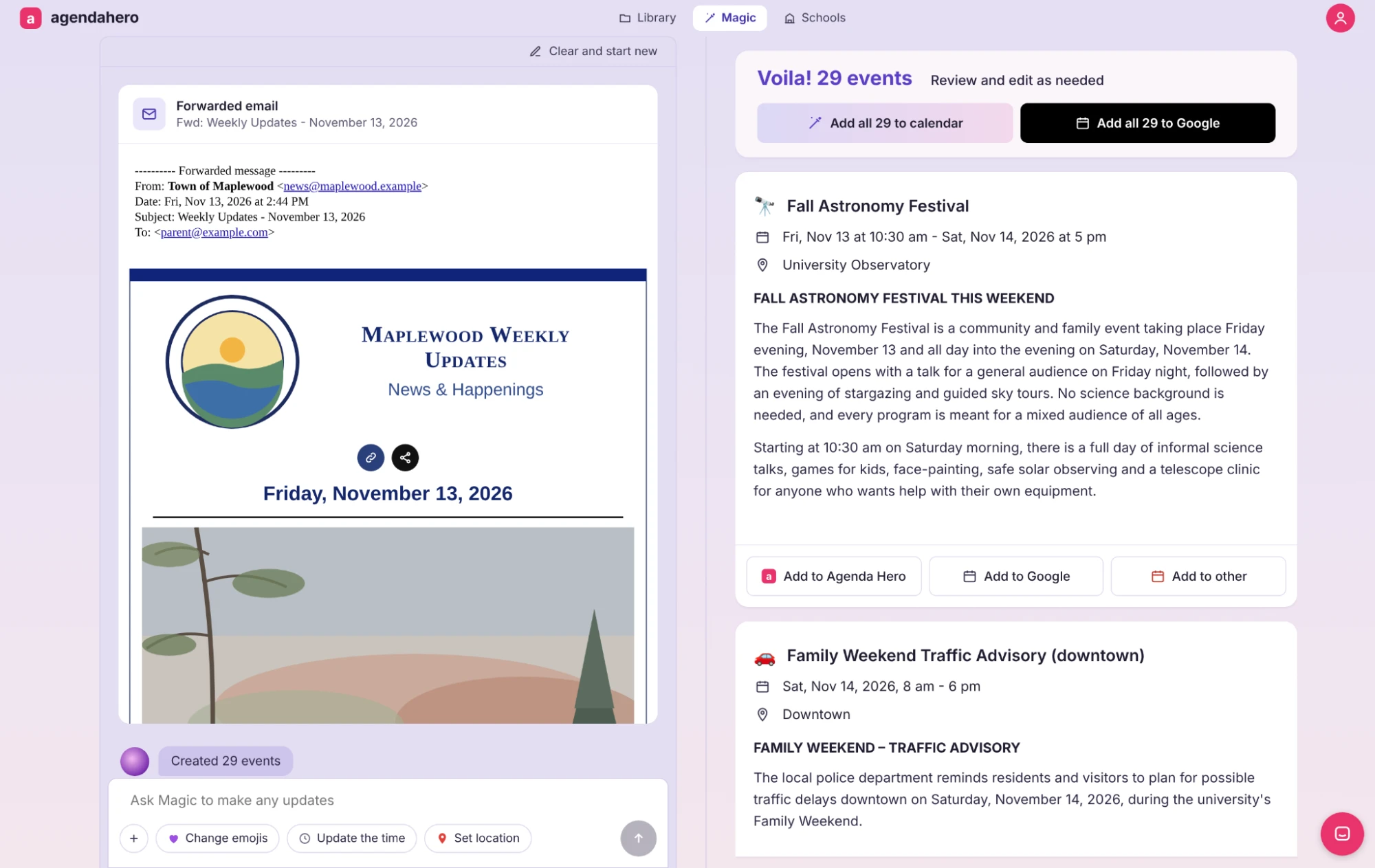
How do I turn an email into calendar events for free?
- Forward the email to [email protected].
- Want only some of the events? Add a note above the forwarded message, like "only the events for the 4th grade."
- Check your inbox.
- Open the results, review them, and add them to Google Calendar, Apple Calendar, Outlook, or Agenda Hero.
Tip: Save [email protected] as a contact so it's there whenever you hit Forward.
For the full guide, read "Forward any email to Magic to turn it into calendar events"
Already have a Skylight? Keep using it.
We love what Skylight has built. A big, visual calendar in the kitchen that the whole family can see is a wonderful way to share the work of keeping everyone on the same page. We're completely aligned with that mission.
If you'd rather not pay for Calendar Plus just to turn emails into events, here's another way:
- Forward the email to [email protected].
- Add the events to your Google Calendar from your results.
- Set up Skylight Google Sync.
Don't have a Skylight? You don't need one.
Not every family can buy a dedicated digital calendar for the home, and that shouldn't be a barrier to making calendar management easier.
With Agenda Hero, you can create, organize, and share your family's schedule without any hardware. Want something on the wall? Print a calendar from one of Agenda Hero's printable views and put it on the fridge, the kitchen wall, or wherever your family gathers. Printable views update automatically when your events change, so you can print a fresh copy anytime.
Everyone can see what's coming up, and everyone can help keep the family organized.
How is it different from Skylight's Magic Import?
| Skylight Magic Import | Agenda Hero email forwarding | |
|---|---|---|
| Cost | Included with Calendar Plus, listed at $79 a year | Free |
| Hardware needed | Events go to your Skylight Calendar | None |
| Reads the email's text | Yes | Yes |
| Where events go | Your Skylight Calendar | Google Calendar, Apple Calendar, Outlook, or Agenda Hero |
Got a PDF schedule or a flyer photo? Upload it in the Agenda Hero app or at agendahero.com/magic instead.
Why we built it
We built Agenda Hero because the work of planning, organizing, and keeping everyone informed should be easier to manage and easier to share. That means tools that are accessible, flexible, and work with the calendars families already use.
Whether you have a Skylight, use Google, Outlook or Apple Calendar, or just want something you can print and stick on the fridge, we want to help.
Quick questions
Does Agenda Hero connect directly to Skylight?
No. Agenda Hero sends events to Google Calendar, Apple Calendar, or Outlook, and your Skylight shows them from there.
Can I forward an email with lots of events in it?
Yes. Agenda Hero finds every event in the email, or just the ones you ask for in your note.
Does it read attachments, like a PDF schedule or a flyer image?
Not yet. Agenda Hero reads the text in the body of the email. For attachments, upload the file in the Agenda Hero app or at agendahero.com/magic.
Can I forward from my phone?
Yes. Use the Forward button in any email app.
Try it: Forward your next email to [email protected].
No hardware. No subscription. Just a little less work on your plate.
Questions or ideas? Email us at [email protected]. We read every one.